

Integration · Claude Enterprise

Noma extends AI Detection & Response to Claude Enterprise

Through Claude’s Compliance API, Noma gives security and compliance teams visibility into how Claude Enterprise is used across the organization detecting sensitive data exposure, policy violations, and suspicious activity so you can scale Claude with governance in place.

How it Works

Claude adoption is moving faster than security's line of sight

Employees across engineering, operations, legal, and finance are working in Claude every day drafting, analyzing, and uploading files to get real work done. That’s the point of Claude Enterprise, and blocking it only pushes usage into unmanaged tools.

The risk lives in the conversation layer: the chats, uploaded files, and activity where sensitive data actually appears. Until now, that layer was invisible to most security programs no endpoint agent or network control sees inside it.

Claude’s Compliance API opens governed, read only access to that layer. Noma turns it into operational security detections, context, and investigation in the same AI DR platform securing the rest of your AI estate.

What becomes visible

Organization wide claude.ai usage who is using Claude, and how
Sensitive data appearing in chats and uploaded files
Activity matching the suspicious behavior logic in your AI. DR profiles
Session context for investigation and audit
Why it matters

From Claude activity to security findings

The Claude Enterprise connector reads activity through Claude’s Compliance API and submits it to Noma’s AI DR engine for analysis. Noma applies the detection profiles you assign and alerts on matching activity.
No endpoint agents. No proxies. No change to how your teams use Claude.

Claude Enterprise

Your organization’s claude.ai activity chats, files, and usage events.

Claude Compliance API

Organizations lack visibility into their AI landscape making it impossible to identify vulnerabilities, misconfigurations and monitor agent behavior.

Noma AI DR

Evolving AI regulations require specialized governance to ensure compliance and oversight

Alerts & investigation

Findings with user and session context in the Noma Console.
Monitoring only by design. This integration analyzes activity after it occurs based on Compliance API data and your assigned AI DR profiles. It does not block Claude Enterprise activity inline.
In practice

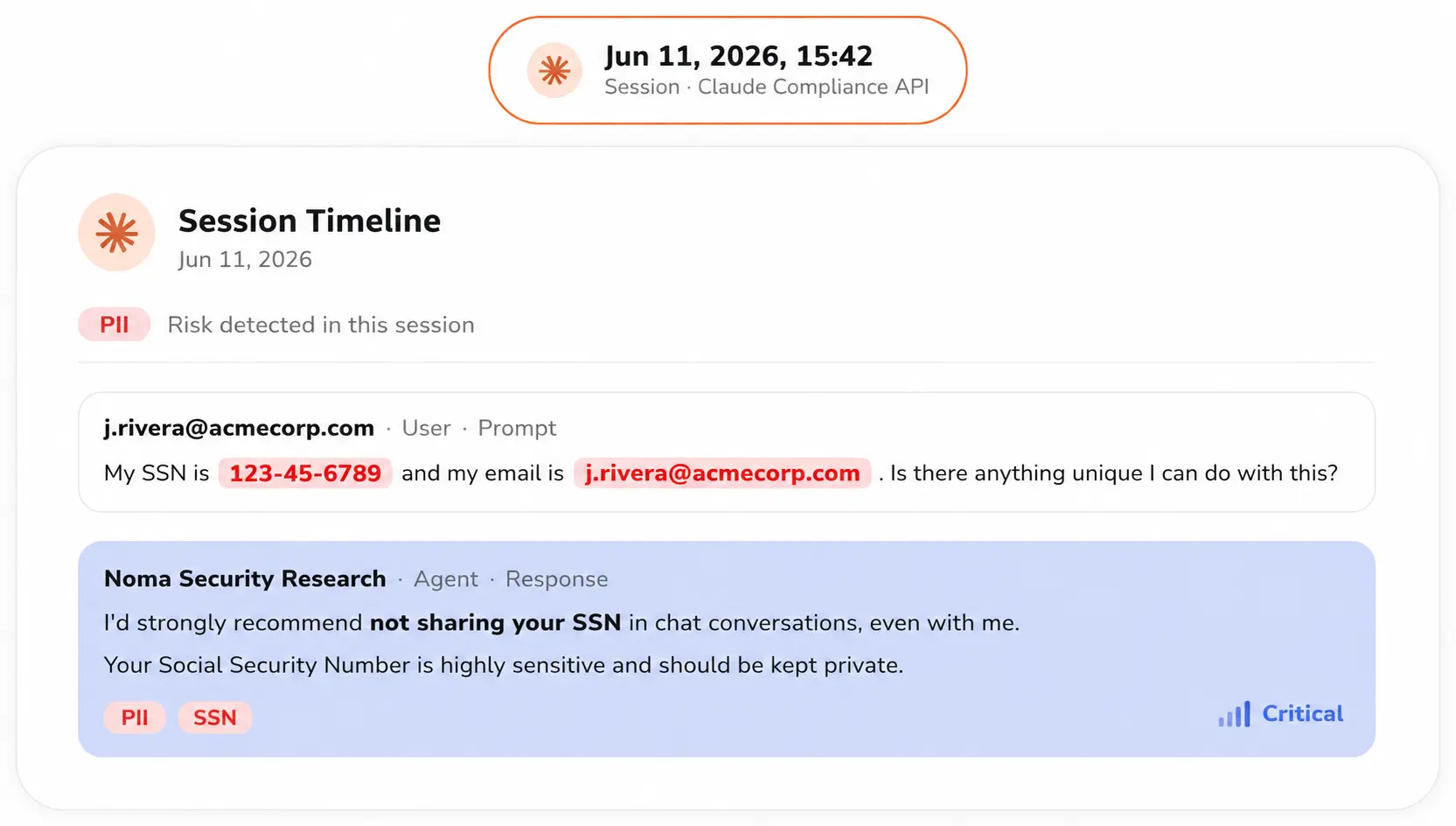
What a finding looks like

Example scenario

An employee uploads a customer contract and asks Claude to summarize the payment terms.

The file contains unmasked personal and financial data. Without visibility into the conversation layer, this exposure never reaches the security team. With the Claude Enterprise connector, Noma’s AI-DR profile classifies it and opens a finding.

Detection

Sensitive data in uploaded file — PII, financial records

Context

User, timestamp, session, and matched AI-DR profile

Next step

Review the session in the Noma Console and respond per policy

What you get

Say yes to Claude, with security in the loop

Visibility

See how Claude is used

Organization wide visibility into Claude Enterprise chats, files, and activity alongside the rest of your AI estate in the Noma Console.
Data protection

Detect sensitive data exposure

AI DR profiles classify PII, PCI, secrets, and other sensitive data appearing in Claude sessions, with the context to investigate.
Threat detection

Flag suspicious activity

Organization wide visibility into Claude Enterprise chats, files, and activity alongside the rest of your AI estate in the Noma Console.
Governance

Evidence for audit and rollout

Reviewable findings and session context give compliance stakeholders what they need to approve broad Claude Enterprise adoption.
Get started

Get started in a few simple steps, no heavy lifting required.

Noma connects directly to Claude Enterprise via Claude’s Compliance API to start securing your usage right away.

What you'll need before you start

A Claude Enterprise organization with Compliance API access enabled
A Compliance Access Key, generated in claude.ai
A Noma Admin account
1

Add the Claude Enterprise connector in Noma

In Noma Console, select the Claude Enterprise integration card and start a new connector.
2

Paste your Compliance Access Key

Noma begins ingesting Claude activity right away. Once connected, you’ll see all ingested data and identified findings in the Noma Console.
More Noma coverage for Claude

Security across the Claude surfaces your teams use

This page

Claude Enterprise

Monitoring only external threat detection for claude.ai activity via the Compliance API.
Real time

Claude Code hooks

AI DR runtime protection for developers using Claude Code, on macOS and Windows.
Monitoring

Claude Cowork

Passive runtime detection for Claude Cowork agents via OpenTelemetry.
The bigger picture

Visibility is what turns caution into adoption

Claude built the Compliance API to give security teams governed access to Claude Enterprise activity. Noma makes that access operational classifying what matters, flagging what’s risky, and putting every finding in the same console that secures your models, agents, and AI integrations.
Blocking AI drives usage into tools you can’t see. Visibility does the opposite: when security can watch the conversation layer, it can approve broader Claude access instead of restricting it and the organization gets the productivity it was promised, with the controls it needs.